Shippensburg University has made the Colour Contrast Analyser tool available through the self-service software installation.
It can be installed automatically on a Windows PC by browsing to the Software Center application:
- Click on the Start button.
- Go to All Programs > Software Center.
- Click on the Colour Contrast Analyser, and then click INSTALL.
Some software packages are also available on macOS by using the Self-Service portal located in the Applications folder.
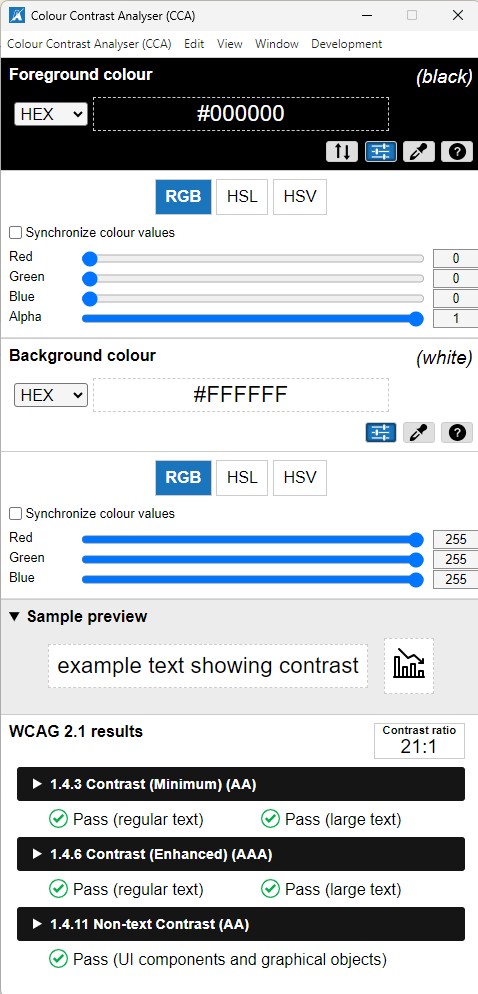
Once it is installed, when you open the tool it looks similar to the below screenshot. When they say foreground color they mean the color of the text you are using. Background is the color behind the text.
For example, if you are creating a table, a graph, or any other graphics where you are putting text on top of a color, it needs to pass the Colour Contrast Analyser to pass ADA compliance.
In the example below, you can see this combination of colors passes with green check marks for ADA compliance and it also gives you the ratio for WCAG standards.
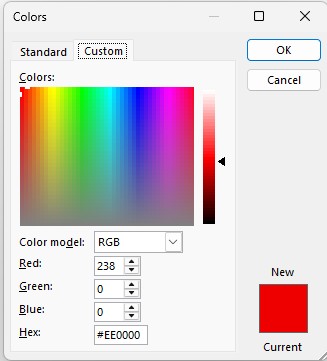
You can find the RGB or the HEX codes for the color of the fonts you are using in the software you are using to create your piece. So for example, in Word, if you choose a font color, you can expand the font colors by clicking or tapping the down arrow next to the font colors. If you click "More Colors," you open a window that looks lilke the below screenshot. The HEX code is provided for you.