

Using Headers
Headers on both the web and in documents are used to tell a screen reader the organization of your page or document.
A sighted person can tell by larger, bolder text that a page is broken up into sections. Someone who is not sighted cannot. Their software needs to know how the page is organized.
In the past, headers in Episerver/Optmizely and in documents have been used sometimes because the person designing the page likes the way a certain header looks better than another. This is an improper and non-ADA-compliant use of headers.
The most important content on the page is H1 or Header 1. If there are multiple sections of content on the page, they should use H2 or Header 2. If there are sections of content within Header 2 content, those sections should use H3 or Header 3.
This creates an outline the screen-reading software can "read" and the non-sighted individual can get a general overview of the page without having to read every word.
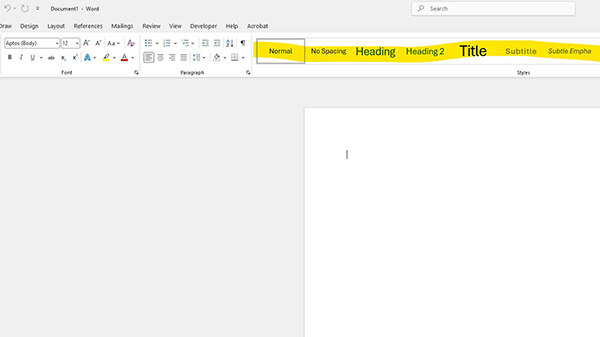
In Microsoft Word, the Headers are in the formatting area of the tool.
Logical Reading Order
Our website and the majority of our documents are presented in English. In English, we read the language from left to right.
Logical reading order is the most difficult item to fix and usually you will be better off to design your document or page than to spend your time trying to fix a non-Accessible design.
The most challenges I find to logical reading order are when tables and columns are used either to present information or to save space so a document doesn't run to multiple pages when printed.
If you must use tables, they need to be formatted using the table formatting tools in the document you are creating. Most tables created on the website are already ADA compliant because the CMS put the proper code into the page when the table is created. Tables should never be copied and pasted from a document into the CMS. They need to be created int he CMS natively.
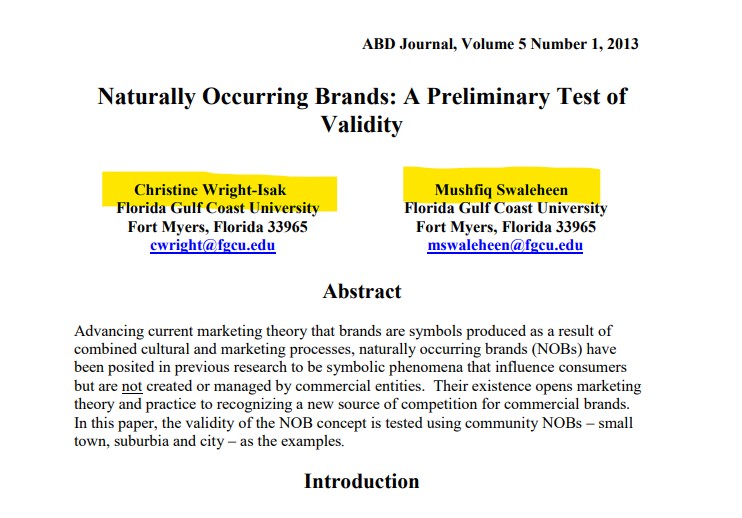
The below document, because of the use of columns for the author names, is not in logical reading order unless the author went into the code of the document and told it to read these areas from top to bottom instead of from left to right.
Even with using the CMS table formatting tools, tables are horrible for any screen size smaller than an iPad. As the majority of people accessing the website are on their phones, it is best to think about how this information could be formatted instead.
Alt tags for images
Every image on the website (and in documents) should have an alternate tag. The guidance around alt tags has changed quite a bit over the years.
If an image exists on the page just to make things look pretty, your alt tag can read "decorative" (without the quotes).
However, if you image is trying to convey information that only a sighted person would be able to comprehend, your alt tag needs to be more descriptive and/or there needs to be text on the page describing the image.
For example, if you have a chart on the page that shows that 95% of all students are undergraduate students and the other 5% are made up of grad and transfer students, if that information doesn't exist anywhere else on the page, it MUST exist in the alt tag.
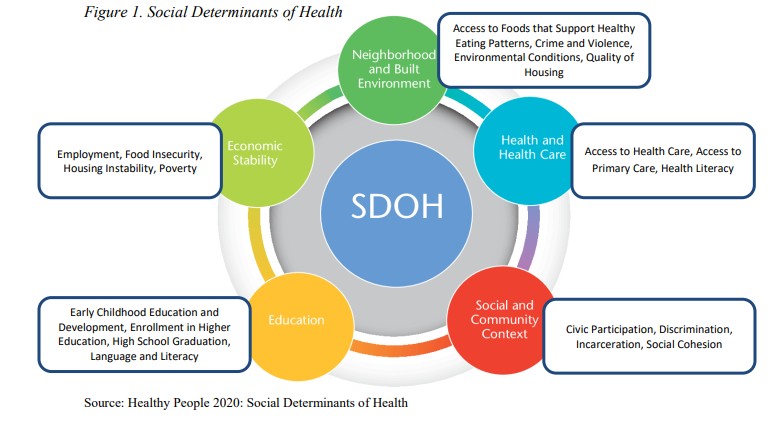
The below is an example of an image that cannot be called "decorative" in the alt tag because it conveys information. The information it conveys must be either in the alt tag or on the page.
Creating Accessible Links
For your links to be accessible, you want the link itself to describe where it leads to. You also want to avoid language like Click here.
An example of how to change a non-accessible link to make it accessible.
Click here. (Not accessible)
Review available internships and professional experiences for each COEHS degree program. (This link is accessible.)
Another thing to be careful of is having text on the page that reads the same and goes to different links.
For example, if you have several Read More links on a page, they all might go to the same content. If they DO go to identical content, that is okay. If they DON'T go to identical content, they need to read differently. Example. The below go to different content and are accessible links.
- Read article about the PA Farm Show.
- Read article about the Fulbright Scholars.